PERSONAL ACTION VAULT Android App on Google Play

Save Reels, Recipes & Workouts in One Private Library. The internet has a Save button. STASH is what happens next.

Stop losing the recipes, workouts, and guides you find on social media. Save links from Instagram, TikTok, and YouTube in one tap. STASH organizes your saved posts, keeps creator captions intact, and turns supported cooking and fitness posts into step-by-step checklists and rep trackers you can actually use.

1-Tap Share Sheet Ingredient & Rep Checklists Biometric Ghost Folders Local-First Vault
LIVE PREVIEW
STEP: 1 OF 3 · TAP SHARE
1-TAP CAPTURE

See it. Share it. STASH it.

One tap from your phone's native Share Sheet. No links to copy. No app-hopping.
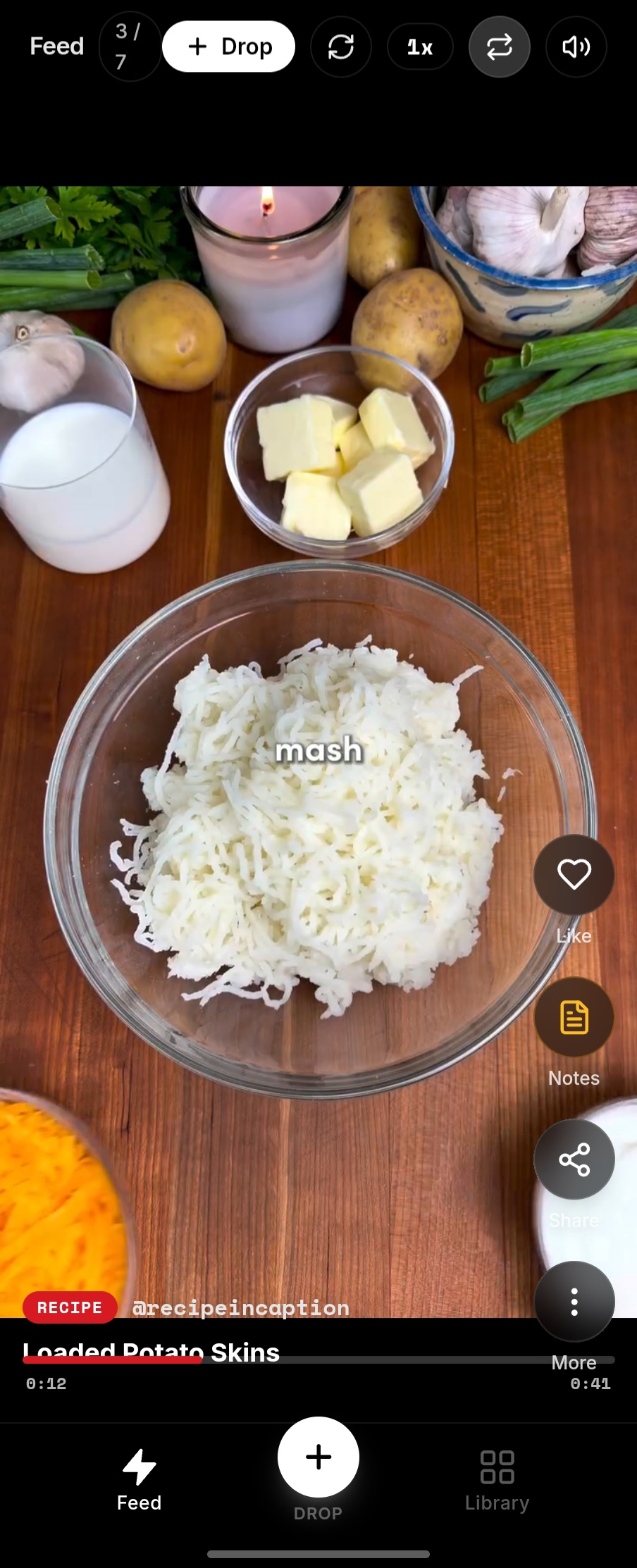
Native system integration: Works with public links from Instagram, TikTok, and YouTube Shorts.
Original Reel in Feed
@recipeincaption Crispy Loaded Potato Skins with Garlic Butter Cream... more
Share to
Messages
WhatsApp
Copy Link
1-Tap Save: No manual link copying
SAVING & STRUCTURING...
Extracting ingredients, player & steps
Docked Player
OFFICIAL EMBED · MUTED
0:14 / 0:45 NO ALGORITHM FEED

Loaded Potato Skins

@recipeincaption · Cook Mode
23 INGREDIENTS
THE REALITY CHECK

Saving is instant.
Finding and using it later is the hard part.

"Social feeds are built for discovery and continuous browsing. STASH is built for what happens after you find something worth keeping."

You save a recipe on Tuesday feeling inspired. On Saturday at the grocery store, you stand in the aisle scrolling through hundreds of unorganized bookmarks trying to locate it. Social bookmarks are silos—designed to keep you scrolling, not to help you do what you saved.

01

Saved everywhere.

Your best finds are scattered across TikTok, Instagram, YouTube, and screenshots. None of them talk to each other.

02

Buried by the next scroll.

The thing you saved last week gets buried by everything you save today. Re-opening social apps to search pulls you right back into the infinite algorithmic feed.

03

A save isn’t a plan.

A fast video flying past on your phone doesn't help when you have flour on your hands or you're resting between gym sets. You need ingredients and steps in order—not video noise.

That’s why STASH exists
THE 1-TAP HABIT

See it. Share it. STASH it.

One tap from your phone's native Share Sheet. No links to copy. No app-hopping.

01 · SPOT IT ANY APP
Social Post Preview
@recipeincaption · Reel
Tap Share
Crispy Potato Skins...

Find something useful

A recipe, gym routine, travel guide, or craft tutorial. Tap the standard Share icon you already use every day.

Works across major video feeds
02 · TAP STASH 1 TAP
System Share Sheet 1-Tap Direct
Messages
WhatsApp
STASH
STASH
Copy Link
1-Tap Save: Preserves the link & creator notes

Select STASH in your Share Sheet

STASH appears directly in your system share options. One tap saves the link, creator handle, and available caption.

Keeps you watching without interruption
03 · SECURED FOR REAL LIFE
VAULT SECURED COOK MODE
4 Russet potatoes (scrubbed)
2 tbsp melted garlic butter
Official Player Docked Offline Ready

Ready when you need it

The video, creator credit, exact source caption, and available action checklist are organized in your private vault.

Offline checklists & private collections
ONE SAVE · THREE TOOLS

One save. Three ways to use it.

STASH keeps the thing you found connected to the thing you actually want to do.

01 · WATCH

Official in-app playback

Watch inside your vault without feed distraction. Muted by default, smooth scrubbing, zero suggested videos baiting you into an hour of scrolling.

No app-hopping to watch
02 · SOURCE NOTES

Creator text preserved

The creator's ingredients, gear lists, and timestamps preserved verbatim with a 1-tap copy button. No AI summaries rewriting their words.

1-Tap Copy to clipboard
03 · DO

Real-world action modes

Cook Mode keeps your phone screen awake while prep steps stay readable. Train Mode runs interval rest timers right between gym sets.

Screen wake lock & interactive checks
WHATEVER YOU LOVE TO DO

Whatever you save. Whatever you actually do.

Recipes and workouts are proof of what STASH can transform. But the vault is built for any video, tutorial, or guide worth keeping.

KITCHEN & RECIPES

A recipe you saved should become dinner.

Your phone is propped on the counter with flour on your hands. You don't need a 60-second video flying past. You need ingredients and prep steps—in order, legible, and ready to check off.
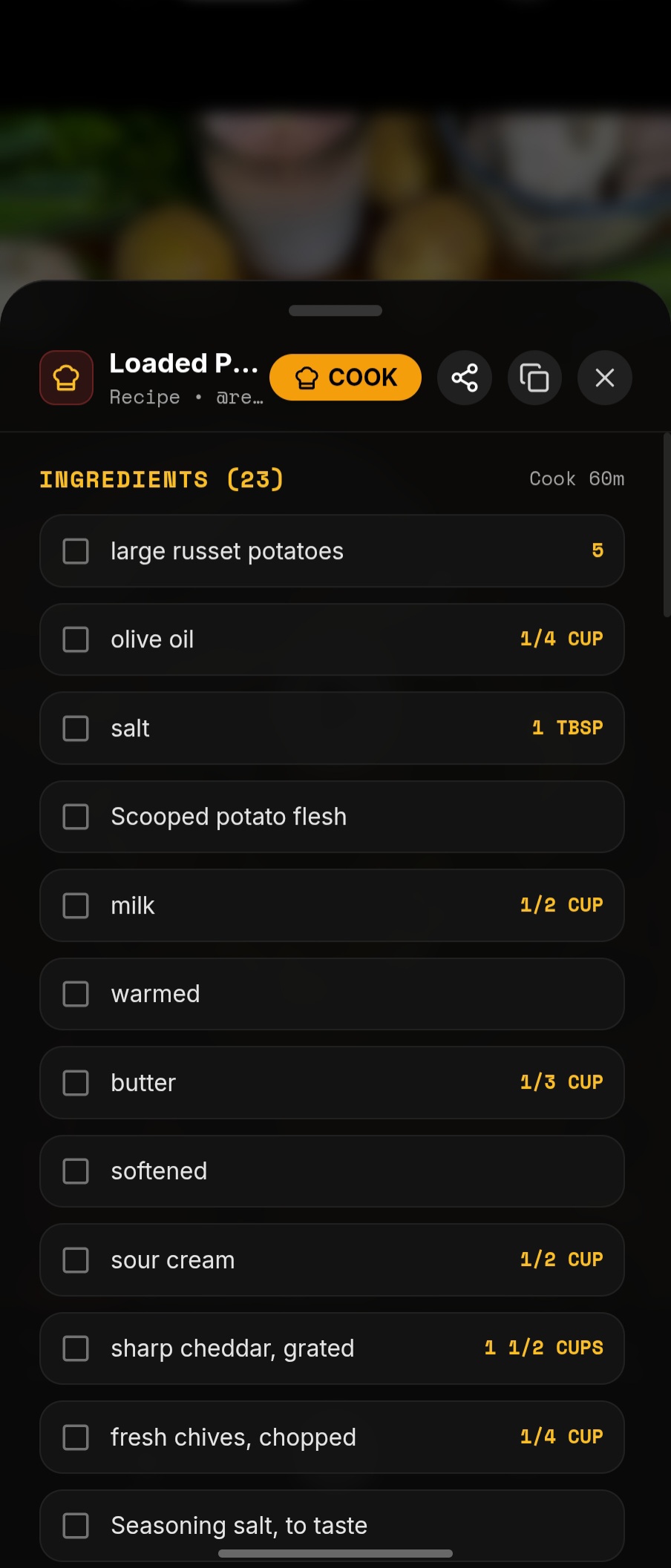
Select Real STASH View:
Steps and ingredients verified directly from source post.
STASH Application Screen
RECIPE DRAWER 23 INGREDIENTS
HONEST APP COMPARISON

How does STASH compare?

See how STASH compares to native social bookmarks, general bookmark managers, and recipe-only apps.

Feature / Capability
STASH Action Vault
Native Social Saves
Instagram / TikTok
General Bookmarks
Pocket / Raindrop
Recipe-Only Apps
ReciMe / Flavorish
1-Tap Android Share Sheet
1-Tap Native
In-app only Browser / Share Manual link copy or web
Cook Mode (Screen Wake-Lock)
Screen stays awake
Screen sleeps (30s) No cook mode Available on some
Train Mode (Gym Reps & Rest Timers)
Built-in rest timers
Re-watch video No gym tools Food recipes only
Biometric Ghost Folders
Invisible when locked
Visible to anyone Obvious padlock No private lock
Multi-Platform Video Bookmarks
Instagram, TikTok, YouTube
Siloed in each app Web links only Food sites & blogs
Distraction-Free Video Playback
Docked player, zero feed ads
Trapped in infinite feed Opens external browser Varies
Platform Focus & Pricing Free on Android
Optional Pro: $2.50/mo ($29.99/yr)
Free (Ad-supported & tracking) Free or $30–$45/yr Often $40–$50/yr (mainly iOS)
HARDWARE BIOMETRICS · GHOST FOLDERS

Some things are just yours.

When handing your phone to a friend to show a pasta recipe, your personal research shouldn’t be sitting behind an enticing padlock. With STASH Ghost Folders, protected collections vanish completely from view.

Interactive Handover Stage
Test the Ghost Folder Discretion System
PUBLIC SAFE VIEW — Zero trace of private folders. No password prompt. Zero suspicion.
Pasta Mastery
14 action recipes
Hypertrophy Chest
8 routine sets
Kyoto Backstreets
22 geocoded spots
Espresso Extraction
6 dialed recipes
BJJ Guard Recovery
11 video breakdowns
Biometric
Private Research
19 confidential saves
Ghost Mode Engaged
Locked collections are completely absent from the UI. Nothing asks for a PIN. Zero awkward questions.
Private when you need it. Invisible when it's locked. Device-level biometrics
01

Zero Padlock Signposts

Visible padlock icons invite questions: "What's in there?" Ghost folders leave zero signposts. They simply do not exist until authenticated.

02

Device-Level Biometrics

STASH taps your phone's native security: Fingerprint, Face Unlock, and device biometrics. Your authentication never leaves your hardware.

03

Local-First Vault

Your saved recipes, workouts, and extracted notes stay on your device's encrypted local database—safe from third-party cloud data-mining.

HONEST INTELLIGENCE

When STASH doesn’t know,it doesn’t pretend.

Generic AI tools fabricate missing ingredients and guess oven temperatures when a creator mumbles. STASH preserves what was actually said, cleans up the formatting, and never invents facts.

Generic Recipe Summarizers Hallucinated Data
Bake at 375°F for 40 mins

Creator never gave a temp. The model filled in a standard default. Your roast burns.

Add 2 tbsp heavy cream

Creator cooked dairy-free coconut milk. Generic model guessed wrong.

STASH Source Fidelity Honest Extraction
Verbatim Creator Notes

If the creator says "cook until fork-tender without high heat," STASH quotes that directly rather than inventing a number.

Synced to Video Timestamps

Steps are linked to the video timestamps so you can cross-check visually in one tap.

Honest AI Principle: If a creator left out the salt measurement, STASH marks it [To Taste / Unspecified]. We respect your kitchen and your time.
Clean Source Notes
Crispy Smashed Fingerling Potatoes
Instagram Reel (@chef_danilo)
Preserved Verbatim

Crispy Smashed Fingerling Potatoes & Herb Aioli
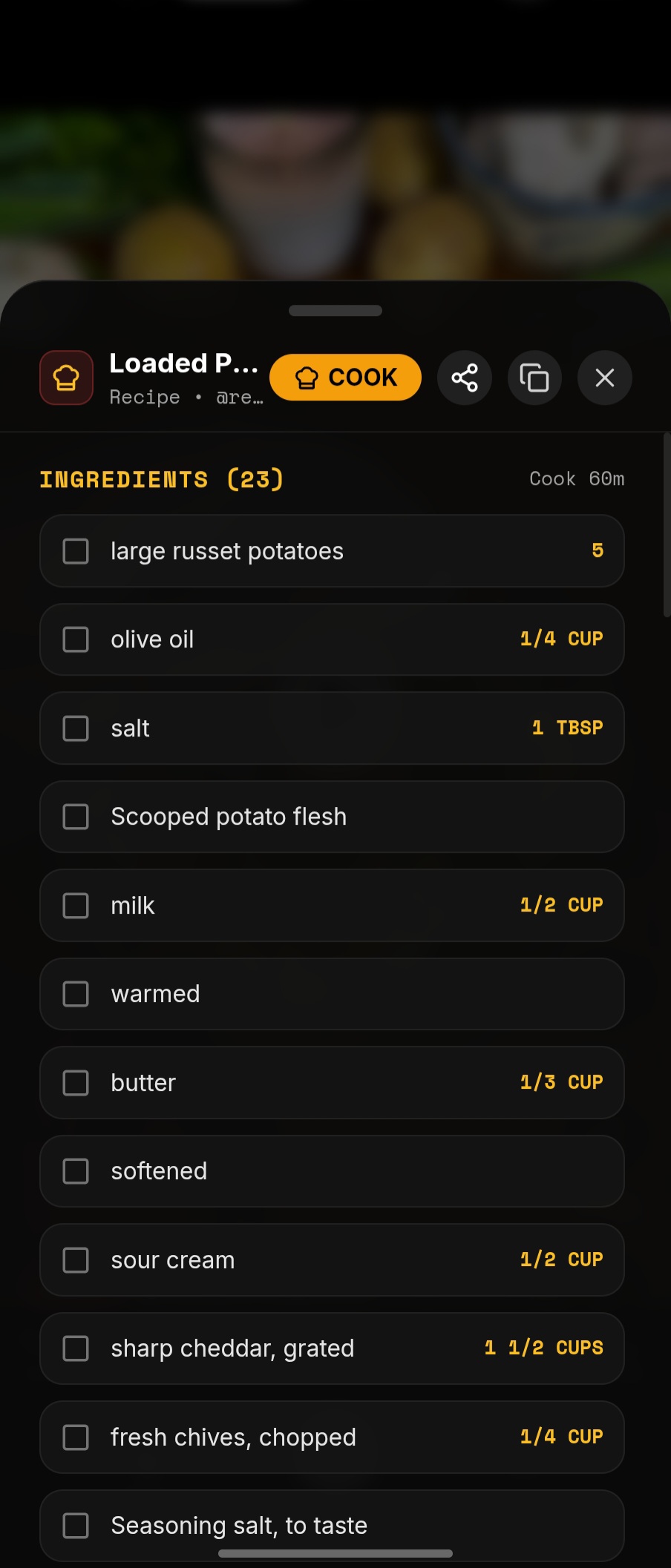
Exact creator transcription · Zero AI hallucination
Ingredients (9 Items)
1.5 lbs Fingerling Potatoes
3 tbsp Extra Virgin Olive Oil
1.5 tsp Flaky Sea Salt
1 tsp Fresh Rosemary (finely minced)
1 tsp Fresh Thyme leaves
1/2 tsp Smoked Paprika
1/2 cup Greek Yogurt / Kewpie Mayo
1 clove Garlic (grated) + lemon zest
Steps · Synced to Video
0:04 Parboil potatoes in salted water for 15-18 mins until pierced easily.
0:12 Steam-dry for 5 minutes on clean towel to remove exterior moisture.
0:18 Crush gently using flat bottom of drinking glass until cracked.
0:24 Drizzle olive oil over parchment sheet and season generously.
0:36 Roast at 425°F (220°C) for 22-25 mins until golden and crisp.
0:40 Whisk aioli base, garlic, and lemon zest. Serve hot.
STASH UI ingredients view
Export anywhere: Paste into Apple Notes, Obsidian, Notion, or your grocery list in 1 tap.
FREQUENTLY ASKED QUESTIONS

Frequently Asked Questions

Clear, factual answers about how STASH saves, organizes, and protects your content.

What does STASH do?
STASH is a personal action vault for Android. When you find a recipe, workout, travel guide, or tutorial on Instagram Reels, TikTok, or YouTube, STASH lets you save it in one tap from your phone's Share Sheet. It organizes your saves in one private library, preserves the creator's original caption, and turns supported cooking and fitness posts into step-by-step checklists and rep counters.
How do I save a Reel or video into STASH?
You don't need to copy and paste links manually. When watching a reel or video in Instagram, TikTok, or YouTube, tap the standard "Share" icon and choose STASH from your system Share Sheet. STASH captures the link, creator handle, and caption directly into your library.
Can STASH turn supported posts into recipes and workouts?
Yes, for posts where the creator includes ingredients or routine steps in their caption or video text. Cook Mode extracts the ingredients into a checkable list and keeps your phone screen awake so it doesn't turn off while your hands are messy. Train Mode extracts exercise routines, reps, and sets, complete with a built-in rest interval timer between sets. If a post doesn't contain recipe or workout information, STASH saves it as a clean bookmark with the original video embed and caption.
Does STASH use generative AI?
STASH uses structured parsing to extract ingredients, prep steps, and workout sets from post text. Unlike generic AI chatbots that may hallucinate or invent ingredients that the creator never mentioned, STASH strictly preserves what the creator actually wrote. If a measurement is missing (like "salt to taste"), STASH marks it clearly rather than guessing.
What is stored locally and what can sync?
STASH is designed with a local-first architecture. Your saved notes, checklists, and folder structures are stored directly on your Android device for instant, offline access. When you sign in with an optional account, your library can securely sync to the cloud so you can back up your collections or switch devices without losing your saves.
Does STASH download videos?
No. STASH respects copyright and platform terms. It does not scrape, rip, or download video files to your device storage. Instead, STASH plays supported videos using official in-app players in a clean, quiet interface with no autoplay feed ads or algorithmic distractions. Your extracted notes, checklists, and folders remain accessible even when offline.
Is STASH free?
Yes. STASH is free to download on Google Play and includes free saves, Cook Mode, Train Mode, and custom folders. For power users who want unlimited saves, advanced exports, and unlimited Ghost Folders, an optional STASH Pro subscription is available for $3.99/month or $29.99/year (which averages to $2.50/month).
How does STASH compare with recipe and bookmarking apps?
Native social bookmarks (like Instagram Saves) trap your content inside separate apps with no checklists and constant feed distractions. Generic bookmark managers (like Pocket or Raindrop) are great for reading articles, but lack kitchen screen wake-locks, workout timers, or video players. Recipe-only apps (like ReciMe) focus exclusively on food and are often iOS-centric with higher subscription costs. STASH is built specifically for Android users who want to organize recipes, workouts, travel, and DIY guides in one unified action vault.
STASH IS LIVE ON GOOGLE PLAY

Save Reels, Recipes & Workouts
In One Private Library.

The internet has a Save button. STASH is what happens next. Turn your saved Instagram, TikTok, and YouTube videos into organized checklists you can actually use.

Get it on
Google Play
Apple iOS / iPhone
Coming Soon In Development
Official In-App Playback Zero Feed Ads Hardware Biometrics
Instant Mobile Install

Scan with your phone's camera to open the STASH listing directly on Google Play.

Scan QR code to install STASH from Google Play Store
Official Google Play Release · Free Download